AV-over-IP is a buzzword in 2022. But what does it really mean? AV-over-IP technology extends, distributes, and/or controls 4K UHD or 4K 60 Hz Video over IP to an unlimited number of screens. Black Box's MediaCento IPX is ideal for extending up to 4K UHD Video over IP to a virtually unlimited number of screens as far as your local network reaches. It can extend (unicast) audio/video from one source to a single screen or distribute (multicast) the same content to multiple screens. If you need the ability to switch between multiple sources or create video walls, simply add in the MediaCento Controller, and the system becomes an IP-based matrix switch and video wall processor. Need more speed? Made to operate over 10-Gbps networks, Black Box's MCX goes a step further to distribute and extend 4K 60 Hz video and audio over IP while supporting these higher speeds, allowing AV and data payloads to exist on the same IT network, and reducing network management time and costs.

Extend, distribute, and control video to an unlimited number of screens using your existing LAN infrastructure. Black Box products offer plug-and-play setup, lossless compression with virtually no latency, EDID compatibility, high speeds combined with comprehensive connectivity and flexible deployment, seamless switching, and advanced video walls, all with complete control.

Unicast or multicast HDMI video and audio to a nearly unlimited number of screens on a network. You need just one transmitter and one receiver for each screen.

The transmitter(s) and receiver(s) install directly into an existing LAN infrastructure.

There's no need to configure any IP settings (although more experienced users can do that if needed).

HD or 4K model extends HDMI digital video/audio up to 100 m between transmitter and receiver (point-to-point) using CATx cable or (4K model only) up to 30 km between transmitter and receiver over single-mode fiber cable using a standard Gigabit SFP module.

Lossless compression and ultra-low latency no matter what the distance or the number of screens.

Extended display identification data (EDID) copy function results in an optimal PC-to-screen performance.

Extend uncompressed 4K 60 Hz 4:4:4 video to an unlimited number of displays without sacrificing latency, video quality, or bandwidth.

Connect every essential AV distribution device to your MCX through its variety of ports: discrete RS-232, IR, secondary audio channel plus a separate 1-GbE connection.

Switch between video sources in less than 100 milliseconds with no artifacts or screen blink.

Increase versatility in video wall deployments with advanced video scaling options, such as multi-view, picture-in-picture, split screen and more.

The MCX Controller lets you manage and monitor AV content with ease.

Deploy on 10G networks over Ethernet, fiber or both.
Black Box meets you where you are today to walk alongside you into the future with premium AV, Multimedia, and Digital Signage solutions. Whether you need Gigabit or 10-Gigabit speeds today, or higher speeds down the road, we’ve got your back. Distribute and extend AV over IP and control everything HD or 4K from a touchscreen or even your cell phone with zero latency for impressive displays and video walls in applications ranging from bar or restaurant hospitality venues to air traffic or 911 emergency control rooms.

MediaCento HD extenders give you better video, compatibility, and control while extending HDMI video signals over a Gigabit Ethernet network. 4K extenders provide optimum 4K AV-over-IP extension, switching, and eye-catching video walls. MediaCento Controller turns your IP-based MediaCento IPX transmitters and receivers into an IP-based matrix switch and video wall controller.
View More
MCX is a next-generation AV-over-IP solution from Black Box. MCX distributes and extends 4K 60 Hz video and audio over IP and is made for 10-Gbps network infrastructures. MCX features uncompressed 4K 60 Hz 4:4:4 video; easy, flexible deployment; advanced video wall capabilities; zero latency; seamless switching; and web UI control.
View more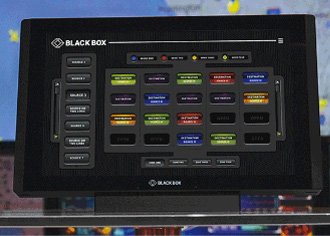
Connect and control everything in small- to medium-sized conference rooms and classrooms with the ControlBridge processor. Manage conference room, control room, and room automation systems with an Ethernet, IP-enabled touch panel. Even add remote control convenience to your ControlBridge system, or use your phone or tablet as a ControlBridge control panel.
View More


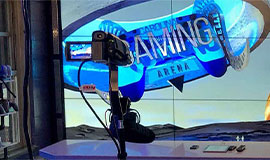
By giving students and other visitors to the Carolina Gaming Arena straightforward control over video distribution, MCX AV over IP Distribution and Control lowers technical barriers to participation in the gaming community.
Read Case Study
Shannon Brewing Company is proud of their one-of-a-kind, award-winning, fire-brewed beer. Made with pure Texas spring water, whole grain, and whole flower hops, the beer is sure to satisfy the palate with its rich, malt flavor.
Read Case StudyWith the prices of 4K monitors coming down, you may notice that a lot more users are migrating to a 4K screen. One of the improvements you may see when using a 4K monitor is faster implementation of Excel spreadsheets since you can see more of the spreadsheets, especially when using an Ultra Wide screen with a 3440 x 1440 resolution. You may also find yourself turning your neck less often if you use a monitor with a curved design.
When selecting a 4K resolution, you want to know what will work for you. In most instances, an Ultra Wide monitor is your best fit, because it optimizes the aspect, width, screen real estate, and user experience. Although every screen has a purpose, if you deploy a 4K screen at the desktop that isn’t Ultra Wide (using 3840 x 2160), you may not be comfortable using the screen unless you tweak the sizing in the operating system.
If using an Ultra Wide monitor, you will typically notice that it has a slight curve. This type of design on an Ultra Wide screen works in a lot of different scenarios, including ones involving large, complicated spreadsheets.
A lot of the 4K video today is pushed over HDMI and DisplayPort cables. Both of these video connection solutions can work well for you, but they do have differences. To start, HDMI (and DVI) use TMDS signals and DisplayPort does not; however, most graphics cards that have DisplayPort can output TMDS signals to support HDMI/DVI displays if you use the appropriate cable and the GPU supports DisplayPort++, or if you use the right video converter. Both HDMI and DisplayPort also carry peripheral data, including embedded audio, which could eliminate one of the audio cables in an application.
Although most desktop users are still running 1920 x 1080 resolutions, more 4K solutions are entering the market to support some advanced applications, including gaming, medical imaging, military, maps/radar, or video production. Pay close attention to the maximum resolution that is supported as well: some of the hardware/software touts 4K video, but is it 30 Hz or 60 Hz video? This can make a huge difference to your application.
Before you migrate from HD to 4K, decide if using a 4K screen is beneficial to your application and/or use. Next, figure out what equipment you need to upgrade (sometimes this requires an upgrade on your GPU, monitor, and any interconnecting cables/equipment). You will tend to find lower prices on 30 Hz displays compared to 60 Hz displays. Most GPUs can do 4K60 by default, but just be cautious when planning it out. Overall in the end, you may find that you are happier and more comfortable using an Ultra Wide 4K screen for your everyday tasks.
About the Author

Product Engineer
Garrett Swindell has 20+ years’ experience programming, implementing server to client communications, and designing intricate control system. As a product engineer, his primary focus is developing connections between users and computers/servers though the use of hardware and software. Garrett assist local and international projects from start to finish with compliance regulations and performing product compliance testing with recognized test houses.

AV-over-IP security should be taken as seriously as the security of your other mission critical systems. By choosing secure equipment and following best practices, you can protect your network, organization and the people you serve while still taking advantage of all the exciting benefits of networked AV.
Read White Paper
Achieve the highest level of automated room control with ControlBridge™. Use this comprehensive system to connect and control everything in conference rooms.
Read Flyer
MCX is the next-generation AV-over-IP solution from Black Box. MCX distributes 4K 60 Hz video and audio over IP and is made for modern network infrastructures.
Read Brochure
MCX is the next-generation AV-over-IP solution from Black Box. MCX distributes 4K 60 Hz video and audio over IP and is made for modern network infrastructures.
Read Brochure
The SDVoE Alliance is a nonprofit consortium of technology providers collaborating to standardize the adoption of Ethernet to transport AV signals in professional AV environments, and to create an ecosystem around SDVoE technology allowing software to define AV applications.
Visit Website
MCX is the next-generation AV-over-IP solution from Black Box. As a Software Defined Video over Ethernet (SDVoE™) enabled solution, MCX utilizes the capabilities of your commonplace modern network infrastructures.
Download Brochure