AV-over-IP is a buzzword in 2022. But what does it really mean? AV-over-IP technology extends, distributes, and/or controls 4K UHD or 4K 60 Hz Video over IP to an unlimited number of screens. Black Box's MediaCento IPX is ideal for extending up to 4K UHD Video over IP to a virtually unlimited number of screens as far as your local network reaches. It can extend (unicast) audio/video from one source to a single screen or distribute (multicast) the same content to multiple screens. If you need the ability to switch between multiple sources or create video walls, simply add in the MediaCento Controller, and the system becomes an IP-based matrix switch and video wall processor. Need more speed? Made to operate over 10-Gbps networks, Black Box's MCX goes a step further to distribute and extend 4K 60 Hz video and audio over IP while supporting these higher speeds, allowing AV and data payloads to exist on the same IT network, and reducing network management time and costs.

Extend, distribute, and control video to an unlimited number of screens using your existing LAN infrastructure. Black Box products offer plug-and-play setup, lossless compression with virtually no latency, EDID compatibility, high speeds combined with comprehensive connectivity and flexible deployment, seamless switching, and advanced video walls, all with complete control.

Unicast or multicast HDMI video and audio to a nearly unlimited number of screens on a network. You need just one transmitter and one receiver for each screen.

The transmitter(s) and receiver(s) install directly into an existing LAN infrastructure.

There's no need to configure any IP settings (although more experienced users can do that if needed).

HD or 4K model extends HDMI digital video/audio up to 100 m between transmitter and receiver (point-to-point) using CATx cable or (4K model only) up to 30 km between transmitter and receiver over single-mode fiber cable using a standard Gigabit SFP module.

Lossless compression and ultra-low latency no matter what the distance or the number of screens.

Extended display identification data (EDID) copy function results in an optimal PC-to-screen performance.

Extend uncompressed 4K 60 Hz 4:4:4 video to an unlimited number of displays without sacrificing latency, video quality, or bandwidth.

Connect every essential AV distribution device to your MCX through its variety of ports: discrete RS-232, IR, secondary audio channel plus a separate 1-GbE connection.

Switch between video sources in less than 100 milliseconds with no artifacts or screen blink.

Increase versatility in video wall deployments with advanced video scaling options, such as multi-view, picture-in-picture, split screen and more.

The MCX Controller lets you manage and monitor AV content with ease.

Deploy on 10G networks over Ethernet, fiber or both.
Black Box meets you where you are today to walk alongside you into the future with premium AV, Multimedia, and Digital Signage solutions. Whether you need Gigabit or 10-Gigabit speeds today, or higher speeds down the road, we’ve got your back. Distribute and extend AV over IP and control everything HD or 4K from a touchscreen or even your cell phone with zero latency for impressive displays and video walls in applications ranging from bar or restaurant hospitality venues to air traffic or 911 emergency control rooms.
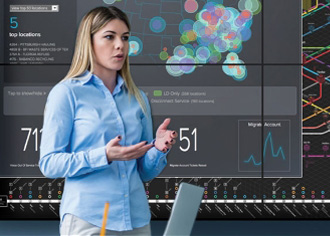
MediaCento HD extenders give you better video, compatibility, and control while extending HDMI video signals over a Gigabit Ethernet network. 4K extenders provide optimum 4K AV-over-IP extension, switching, and eye-catching video walls. MediaCento Controller turns your IP-based MediaCento IPX transmitters and receivers into an IP-based matrix switch and video wall controller.
View More
MCX is a next-generation AV-over-IP solution from Black Box. MCX distributes and extends 4K 60 Hz video and audio over IP and is made for 10-Gbps network infrastructures. MCX features uncompressed 4K 60 Hz 4:4:4 video; easy, flexible deployment; advanced video wall capabilities; zero latency; seamless switching; and web UI control.
View more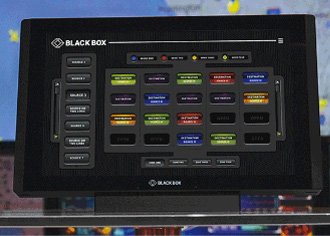
Connect and control everything in small- to medium-sized conference rooms and classrooms with the ControlBridge processor. Manage conference room, control room, and room automation systems with an Ethernet, IP-enabled touch panel. Even add remote control convenience to your ControlBridge system, or use your phone or tablet as a ControlBridge control panel.
View More


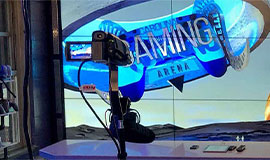
By giving students and other visitors to the Carolina Gaming Arena straightforward control over video distribution, MCX AV over IP Distribution and Control lowers technical barriers to participation in the gaming community.
Read Case Study
Shannon Brewing Company is proud of their one-of-a-kind, award-winning, fire-brewed beer. Made with pure Texas spring water, whole grain, and whole flower hops, the beer is sure to satisfy the palate with its rich, malt flavor.
Read Case StudyHow maintaining network and data security can help you take full advantage of AV-over-IP
In the past, audiovisual systems were typically contained within an isolated network. Today, countless devices connect to and communicate over IP networks to enable the exchange of data — including audio and video — in a wide array of applications. Highly interconnectable, scalable, and user friendly, AV over IP comes with many advantages, but it also can present an increased potential for security breaches. To make full use of the benefits of AV-over-IP systems, follow these seven best practices for AV-over-IP security.
Thoroughly educate staff on how to use your network equipment. Without a thorough introduction to the AV-over-IP network there exists a greater chance of inadvertently creating issues that could lead to damage or outages and resulting downtime.
This best practice is short and sweet: Encrypt all of your data using SSL/TLS. Supporting data privacy, integrity, and authentication, encryption should ensure that communications between any two known “peers” remain secure.
Ensure your devices are properly locked down with no open ports — such as VNC, SSH, TeamViewer or internal services — that could be exploited by hackers. Limit physical ports via your management platform to help prevent unauthorized access via USB or other hardware devices. Back-rack critical equipment, through AV/KVM extension systems, and use lockable cables to physically secure devices. Act quickly if a device vendor announces a vulnerability and apply appropriate patches immediately to close potential hackers' window of opportunity.
Change default credentials and update passwords regularly. Never leave the default password on a new system or device unchanged. Use strong passwords and take steps to encourage staff members to do so as well. You've heard it before, but it's worth repeating: Strong passwords should have at least eight characters, including numerals, punctuation marks, and a combination of uppercase and lowercase letters.
A dedicated AV network (with a separate power source) can bring an added level of security to mission- critical display systems. With out-of-band (OOB) management capabilities, you can maintain access and control even if the primary data network goes down. You can also deploy a software-based site-to-site virtual private network (VPN) and use its dedicated connections and encryption protocols to securely display content on one or many displays from a single location.
Consider how sensitive the data is and whether remote access is worth the added security risk and/or precautions necessary to protect that data.
The combination of intrusion detection system and deep package inspection can help you identify unusual traffic on your AV-over-IP network. Together these systems can monitor various types of activity and automatically provide real-time alerts and alarms in the event of irregularities or attempts at network infiltration.
Security is largely a matter of common sense, backed up by best practices. Use these seven suggestions for securing your network and devices so that you can focus on the benefits of AV over IP.
To learn more about effective actions to secure your AV-over-IP system, download our free white paper AV-over-IP Security: Best Practices to Protect Your Network, Organization and the People You Serve.

AV-over-IP security should be taken as seriously as the security of your other mission critical systems. By choosing secure equipment and following best practices, you can protect your network, organization and the people you serve while still taking advantage of all the exciting benefits of networked AV.
Read White Paper
Achieve the highest level of automated room control with ControlBridge™. Use this comprehensive system to connect and control everything in conference rooms.
Read Flyer
MCX is the next-generation AV-over-IP solution from Black Box. MCX distributes 4K 60 Hz video and audio over IP and is made for modern network infrastructures.
Read Brochure
MCX is the next-generation AV-over-IP solution from Black Box. MCX distributes 4K 60 Hz video and audio over IP and is made for modern network infrastructures.
Read Brochure
The SDVoE Alliance is a nonprofit consortium of technology providers collaborating to standardize the adoption of Ethernet to transport AV signals in professional AV environments, and to create an ecosystem around SDVoE technology allowing software to define AV applications.
Visit Website
MCX is the next-generation AV-over-IP solution from Black Box. As a Software Defined Video over Ethernet (SDVoE™) enabled solution, MCX utilizes the capabilities of your commonplace modern network infrastructures.
Download Brochure








Leave a commentOrder by
Newest on top Oldest on top